
Main Menu
Content below follows the workflow order for entering listings into the MLS. You may use the shortcut links in the sidebar to the left to jump to the content you wish to see.
All new MLS mandatory listings must be entered in the MLS system within one (1) business day of public marketing. If not entered within 1 business day, there is a fine of $500/day (up to $7500).
If public marketing has not yet begun, the listing must be entered into the MLS within four (4) calendar days after the effective date of the listing contract. Listings entered after Day 4 will incur a fine of $100 per day, up to a maximum of $2,500; additional details and FAQs can be found here.
If a seller is not yet ready to fully market or show the property, the listing should be entered in Delayed status. It is against MLS rules to include verbiage such as “not to be entered into MLS until X” to avoid entering a listing within the required time frame.
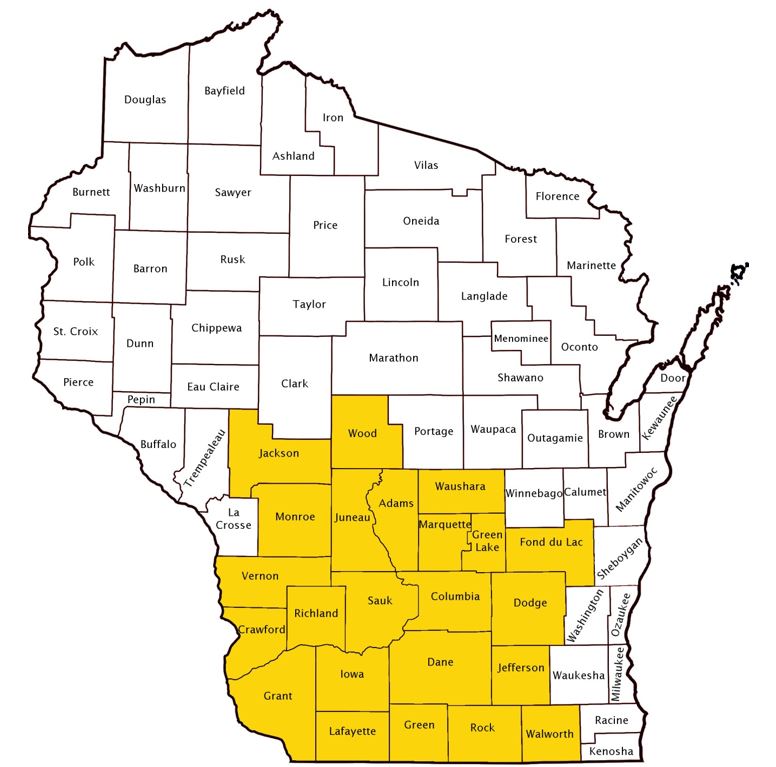
MLS mandatory listings include Single Family, Condominium, Multi Family of 8 units or less, and Lots & Acreage listed for sale and located in the South Central WI MLS service area (Dane County and the surrounding Wisconsin counties of Adams, Columbia, Crawford, Dodge, Fond du Lac, Grant, Green, Green Lake, Iowa, Jackson, Jefferson, Juneau, Lafayette, Marquette, Monroe, Richland, Rock, Sauk, Vernon, Walworth, Waushara and Wood Counties). Auction, Rentals, and Commerical listings are optional.
A calendar day other than Saturdays, Sundays, any legal public holiday under Wisconsin or Federal law, and any other day designated by the President such that the postal service does not receive registered mail or make regular deliveries on that day.
Public marketing includes, but is not limited to: flyers displayed in windows, yard signs, digital marketing on public facing websites, brokerage website displays (including IDX and VOW), digital communications marketing (email blasts), multi-brokerage listing sharing networks, communication which introduces the property to agents outside the listing firm, and applications available to the general public.
NOTE: The earliest a property may be advertised is the effective date (first day of the term) of the listing contract:

If any detail of a specific property, sufficient to activate the interest of a potential buyer, is publicly marketed before the effective date of the listing contract for said property, the listing agent shall be fined $200 per day (up to $5000), from the time of advertisement until the effective date of the contract. Click the link below for additional information on this rule.
If your office inputs its own listings, do not send paperwork to the SCWMLS office. If you want the MLS to input your listing, email a completed profile sheet and a copy of the listing contract to listings@wisre.com. The cost of inputting a listing is $50.00 if loaded by the SCWMLS. NOTE: All MLS listed properties can be entered only once in each applicable category. An exception can be made for properties with legally divisible parcels of land.
See below for information on Paragon access levels for agents & staff:
Do not include dollar signs, periods or commas for dollar fields; punctuation is generally not allowed on Paragon listings – with the exception of Directions and the Remarks which are free-form fields.
Agent & company contact information is not allowed in public-facing sections of the MLS. This includes photos, photo labels, photo watermarks, unbranded virtual/video tours, public associated documents, public remarks, and directions. Information such as names, phone numbers, email addresses, websites, branding/logos, or instructions to contact/call anyone may not be included in these sections of an MLS listing. This restriction also applies to builder information. You will be assessed a $50 fine and MLS staff will remove the information from your listing.
An exception is made for public associated documents that are contractual in nature (ex: RECR, addenda). Contractual documents may display the name of the listing firm, but it must be in typeface no larger than the median typeface of the document. Photo watermarks are limited to the real estate license number of the MLS Participant Broker.
On the Paragon input screen you will see a red (R) next to the fields that require an entry – these are the fields that are white on the Profile Sheet. This means you must have something in the field. You will be assessed a fine of $50 per day (up to $250) for not correcting inaccurate/missing data within 3 days after first notice from MLS staff.
You are responsible for the accuracy of the data you report, including, but not limited to, room dimensions, square footage, type-features, etc. No Member will intentionally insert false or misleading data. FSBOs, one party listings and building contracts added to the MLS system as comparables must contain the same information as is required on active listings. You will receive a $50 fine for incorrect data that is not corrected 3 days after first notice from MLS staff.
Communicating seller concessions within the MLS is allowed and remains a valuable marketing tool. Please follow these directives to maximize transparency and correctly communicate seller concessions within the MLS:
A new listing contract must be secured before a listing can be entered as new. If the MLS discovers a new listing contract was not obtained, the new listing will be deleted and the listing broker will be fined $50. It is not acceptable to draft only an amendment to create a new MLS listing.
The days on market (DOM) count resets each time a new listing is entered. As DOM begins counting at the list date, to ensure a DOM count of 0, a listing must be entered on the list date. The cumulative days on market (CDOM) count will reset if a listing has been off the market for at least 31 days. When counting, don’t include the off-market date or the new list date – there should be 31 days in between. Days on market do not accumulate while a listing is delayed, withdrawn or offer-no show status.
Some third-party websites may calculate or display Days on Market (DOM) differently than Paragon. Because these are external platforms, the DOM shown on those sites may not always match what members see within Paragon.
This does not necessarily mean the third-party information is incorrect; it may simply reflect a different calculation method, display logic, or data presentation format. Similar to how listing photos may be uploaded in one order but displayed differently on consumer-facing websites, third-party platforms may organize or present listing information in ways designed for their own systems and users.
Auction properties are optional for entry in the SCWMLS. If you do choose to enter an auction listing, please adhere to the following requirements:
Properties that are listed with both a Participant and a non-participant of the South Central Wisconsin MLS may be submitted for publication to the SCWMLS provided said non-participant is a REALTOR® and is a Member of another REALTOR® MLS or CIREX, and provided said non-participant agrees in writing to abide by the Rules and Regulations of the South Central Wisconsin MLS. A completed and signed MLS Co-Listing Agreement must be submitted to the SCWMLS office before a listing is input.
Condos that are either stand-alone or half-duplexes (1 or 2 units per building) are allowed to be marketed secondarily under the Single Family category. Condo fees must be listed in the public remarks and/or Annual HOA Dues field and “Condominium” must be selected under the Type feature category.
Single family properties that have a shared wall or a monthly maintenance fee are allowed to be marketed secondarily under the Condo category. The Type feature “not a condo (single fam)” must be selected.
Studio condos can be identified as having 0 or 1 bedrooms, at the option of the listing agent. However, they must be identified by the Type feature “Studio.”
Condo units with no living space (ex: piers, garage/parking stalls, storage units) may be marketed under the Lots & Acreage category, provided the unit is available for purchase to the general public (not just unit owners). The Type feature “Condo – Separate Amenity” must be selected, and the first line of the public remarks must disclose that it is a condo parking, pier, or storage unit with no living space. These listings may remain in the system once they expire or sell.
There is not a separate Farm Category – Farm type properties with a residence should be listed under the Single Family category (those without a residence are restricted to the Lots & Acreage category). If you enter a listing under either category and select the “Farm” Type feature, you are required to attach a Farm Associated Document at the time the listing is entered into the MLS database.
When entering non-MLS listed properties as comp sales, the following guidelines are to be used:
Non-Member List Agent – If you are the selling agent of a property that was listed by a Member of another MLS and falls within one of these counties, the listing should already be in the SCWMLS. If you were not properly credited with the sale, please notify us at listings@wisre.com and provide proof of you being the sale agent (ex., closing statement and/or accepted offer packet) and we will update the listing. If the listing is outside of these counties and does not appear in the SCWMLS, you may enter the listing as a comp sale once it has closed. Enter yourself as the listing and selling side and add the name of the actual listing agent & office to the broker to broker remarks. After the listing is entered, email listings@wisre.com and request the list side be changed to SCWMLS Non-Member.
Non-Member Sale Agent – If the selling agent/office of your listing is not a Member of our MLS, use SCWMLS Non-Member for selling agent and selling office and add the name of the actual agent & office to the broker to broker remarks. Please use this option only if the office/agent is not listed in our database. Members of Rock/Green MLS are listed in our database, and therefore should be entered when they are the selling side on your listing.
Members of the SCWMLS are allowed to market existing homes with no land included in the sale on the MLS provided the structure is not being conveyed by motor vehicle title, and the land lease (if applicable) is for more than one year. The actual physical location must be identified and a disclaimer must be included in the first line of the public remarks explaining that no land is included in the sale. Also, the following specific wording must be included in the Broker to Broker remarks section: “DSPS forms related to the listing and sale of real property may not be appropriate for this transaction.” These listings will be deleted when they expire or sell.
A disclosure of the fact that a property is legally condemned must be included in the first line of public remarks. An explanation of the reason for condemnation may be included, but is not required.
If a Participant lists a property for which limited services are offered, the Participant must disclose this by selecting “Yes” under the Limited Service field in the MLS. A form outlining exactly what services will not be provided by the Participant is also required to be attached at the time the listing is entered into the MLS database. Click here for a copy of this Form.
If the cooperating broker works directly with the seller, they should notify the listing broker within 5 days of an accepted offer and when the property closes so the listing broker can update the MLS in a timely manner.
Manufactured homes consist of one or more sections and can typically be identified by the following features:
When submitting a manufactured home WITH land to the SCWMLS, you must identify the listing by selecting the Type feature “Manufactured with Land”. The Associated Document for Manufactured Homes with Land must also be completed and attached to the listing. The words “single wide” must appear in the public remarks for listings of single wide manufactured homes. More information on Mobile/Manufactured homes can be found here.
Members of the SCWMLS are also allowed to market manufactured homes WITHOUT land on the MLS. When listing a manufactured home without land, the following statement must be included in the Broker to Broker remarks of the listing:
Personal property sale – No approved forms – see www.scwmls.com/pdf/mh.pdf
The Type feature “Manufactured-NO LAND” must also be selected. Click here for details and restrictions pertaining to listing manufactured homes without land (personal property). Manufactured homes without land are deleted when they expire or sell.
The Multi Family category is limited to multi-unit buildings that contain two or more separate dwelling units. An exception can be made for single unit properties that are zoned multi family. For single unit properties that are zoned multi family, the listing must have the “single family-zoned multi family” feature selected under the Type feature group.
Single family listings are not allowed in the Multi Family category, and multi family listings are not allowed in the Single Family category. An exception can be made for multi family dwellings that were originally single family dwellings and can be converted back (these may be listed in Single Family as well as Multi Family). What is required to convert it back to single family use must be clearly explained in the public remarks (ex: remove wall, add door between units, open up stairwell).
We will allow multiple listing entries within the same category, provided they are legally permissible.
If a seller specifically directs that their property not be advertised, marketed, or promoted in any way to the general public or to any agent outside the listing firm, that listing is not required to be entered on the MLS. In these cases, the listing broker must submit the fully executed Multiple Listing Options for Sellers Authorization Form along with the listing contract to the SCWMLS within 4 days of the effective date of the listing contract (Email to listings@wisre.com). There is a $100 per day fine (up to $2500) if not submitted within 4 days.
Firm exclusive listings are intended to protect the privacy of a seller who does not want a large number of people to know their home is for sale. For this reason, firm exclusive listings can only be shared with the following groups:
If a firm exclusive listing is displayed or advertised to the general public or to agents outside the listing firm, to avoid penalty, it must be submitted to the MLS for cooperation within 1 business day. If not submitted within 1 business day, there is a fine of $500/day (up to $7500). This includes advertising done by, or on behalf of, the seller.
Additional considerations to keep in mind:
Additional information & FAQs on the Clear Cooperation Policy and firm exclusive listings can be found below.
Residential properties for rent can be included within the Paragon program. If you have access to add listings, you can add rentals by clicking on Listings – Add Listing – Rental. To search for rentals click on Search – Search by Class – Rental. Click here for a copy of the Rental Profile Sheet.
Single Family properties that are located in a City or Village and have municipal water and municipal sewer may not be identified by the Lot Description features of “Rural-in subdivision” or “Rural-not in subdivision”.
To help identify the location of rural property within a township, Other Marketing Area can be used. Click here for more information.
The Type feature pick list contains three distinct stages for properties under construction or newly built:
Under construction properties may be entered only once, and if construction has not started, the “building plan with lot” feature must be selected (rather than “under construction”). It is important to update the feature as a home moves from plan, through construction, to finish. The MLS will delete expired listings of properties for which construction was never started.
If the house number is not yet assigned, be sure to include specifics such as 2nd from the corner in the directions. Enter the lot number in the street number field (ex: L6).
Photos are not required until construction is complete, but sketches, floor plans and plat maps may be submitted as photos for properties under construction. If you submit a photo of a completed similar model, please affix the words similar model to the photograph or add similar model as a photo label. Once construction is complete, a photo of the actual home is required.
If you add upgrades or finish more square footage than the original listing in the MLS states, please adjust the list price and applicable fields/features in the MLS to reflect these changes. We often see the sale price several thousand dollars more than the list price due to buyer requested additions/upgrades. This of course makes it difficult to use these solds for appraisals and CMAs, and you can be assessed $5/day (up to $100) for incorrect data, if not adjusted.
The Lots & Acreage category is limited to vacant land, and land with buildings other than residential structures. An exception can be made for properties that have a residential structure with little or no value. Those listings can be listed under Lots & Acreage, provided the “residential structure with little or no value” feature is selected under the Improvements feature group.
If you have several lots for sale, you may wish to add a listing for each lot OR add one listing to represent some or all of the lots. If you choose to enter one listing to represent more than one lot, do not list the total acreage of the combined lots in conjunction with the price of one lot. Pick one lot; list the size of that lot in conjunction with the price of that one lot. It is very difficult to search using acreage and price when the acreage entered doesn’t match the price listed. The other available lots must be noted in the remarks.
If you choose to market more than one lot under one single MLS number, and one of those lots sells, enter the lot that sold as a separate sold comp listing. Instead of entering it as an Active listing, enter it in Sold status. Use the actual contractual list date (the 4-day input rule does not apply to listings entered as Sold) and expiration date. Remember to adjust the remaining Active MLS listing to reflect the lots that are left to be sold. You can use the Copy/Clone feature in Paragon to save a lot of time.
Traditionally, when a property is listed for sale, it is placed on the market at a fixed price. Under value range pricing, the property is marketed in a range of values, rather than one specific price. It is important to understand that value range pricing is simply a marketing tool which brokers and sellers can elect to utilize (or not). When entering the price for a value range priced property, you must enter the contractual list price in the List Price field in Paragon. The price range, as agreed to for marketing, must be entered in the first line of the MLS public remarks.

*Unless future show date is noted in public remarks.

Click here for a pdf version of the above graphic.
If a seller instructs you to withhold their new listing from the MLS for a limited time, that listing must still be entered into the MLS within 1 business day of marketing (or 4 days of the effective date, if marketing has not yet begun), but should be entered in a status of Delayed until such time as it is ready to fully market and show. It is against MLS rules to include verbiage such as “not to be entered into MLS until X” to avoid entering a listing within the required time frame.
The listing broker must upload a fully executed Multiple Listing Options for Sellers Authorization Form to the associated documents (use the Document Type MLOSF-Delayed Listing or Firm Excl) within 4 days of the effective date. There is a $100 per day fine (up to $2500) if not submitted within 4 days.
The Show Date field, a valid address, and bona fide list price are required for listings in Delayed status. While Delayed, photos are not required, days on market are not counted, the listing will not come up in active searches. Delayed Listings will be sent out via IDX feeds, however, its the websites decision to display delayed listings. Delayed listings are included in Collab Center and auto-notification emails from the MLS, as well as VOWs (Virtual Office Websites) and IDX. All brokerages may display delayed listings through IDX, even if the listing is not theirs. When sharing Delayed listing information with consumers, agents should explain that Delayed status means the property is not yet available to show and that listing information may not yet be finalized. If you prefer that the listing not be displayed on IDX sites, you’ll need to change the Internet / IDX field to “No”, as it defaults to “Yes.”
Properties may remain in Delayed status for an initial period of up to 45 days. One extension of an additional 45 days is permitted, for a maximum of 90 days in Delayed status. To request an extension, the Listing Firm must provide the MLS with an amendment signed by all parties to the contract prior to the expiration of the initial 45-day period. If no signed amendment is received by the 46th day, the property will automatically be moved to MLS Suspended status.
If you are accepting a sight-unseen offer for your delayed listing, you have 3 days to either change the status to Offer-No Show (PND) or Offer-Show (AC), OR you can indicate in the broker remarks “Accepted Offer Sight Unseen” and keep the listing in a delayed status.
Note: the listing must be made Active prior to an Offer-Show (AC) status.
Listings for which the seller is not ready to show, but would like to fully expose to the public, may be entered as Active instead of Delayed. If entered as Active, the date showings will be allowed is required to appear in the first line of the public remarks. The Show Date field is optional for Active listings. If a Show Date is entered, it will restrict the ShowingTime calendar until that date. Once a listing is Active, it may not be subsequently moved to Delayed status. If a seller elects to temporarily suspend showings on an Active listing, the date showings will resume must be noted in the first line of the public remarks.
NOTE 1: All MLS mandatory listings must be made available for showings on the list date unless otherwise specified in the listing contract. If a new listing is to be entered as Delayed, or as Active with restrictions to show at a later date, nobody, including the listing firm, can show the property during the period between the effective date and entry into the MLS. The grace period for MLS entry allows time to gather information. It does not provide an opportunity to show the property if it will not be available for showings when it hits the MLS.
NOTE 2: While a listing is in the status of Delayed or Active with no showings, it cannot be shown to potential buyers by anyone, including the seller, or previewed by any agent, including the listing firm. Agents from the listing firm may be given access to the property on an individual basis only to assist the listing agent with marketing preparations (i.e. staging, offering a price opinion). Any type of group tour by the listing firm is considered a violation.
NOTE 3: There is no exception for a potential buyer who previously viewed a listing to view a listing while it is Delayed or Active with no showings. In the event an appointment to show a Delayed or Active listing was made based on the anticipated show date, and the listing is later made unavailable for showings on the date the showing is scheduled to occur, the appointment must be cancelled by the listing firm.
NOTE 4: If an estate sale/auction will be held inside any part of the home, the status must be changed to Active before it begins. This will allow the public to access the property during the sale without it being a violation. If individual showings will not begin until a later date, please include the following statement in the first line of the public remarks so the situation is clear: Estate sale being held DATE/TIME. Individual showings begin DATE.
Fines of up to $15,000 and suspension of MLS services may be imposed on both the listing agent and the showing agent if found in violation.
When you receive an accepted offer, you have 3 days to change the status of that listing to either Offer-Show (AC) or Offer-No Show (PND). The only exception is if there is a bump clause in the offer, a short sale situation, or your listing was in a Delayed Status accepting a sight-unseen offer.
If there is a bump, or if the property is a short sale, you will have 3 days to either change the status to Offer-Show (AC), Offer-No Show (PND), Offer-Bump (AB), or you can leave the status as Active, but you must disclose the existence of the offer in the first words of the Broker to Broker remarks (Accepted Offer Bump Clause or Accepted Offer Short Sale).
If the listing is in a Delayed Status and you are accepting a sight-unseen offer, you have 3 days to either change the status to Offer-No Show (PND) or Offer-Show (AC), OR you can indicate in the broker remarks “Accepted Offer Sight Unseen” and keep the listing in a delayed status.
Note: the listing must be made Active prior to an Offer-Show (AC) status.
When recording an Accepted Offer, you will be prompted to enter the date of acceptance and if there were competing offers at the time of acceptance. Competing written offers is an optional field at the time the status is changed to AC, AB or PND, but required once SOLD.
At the time showings are no longer being allowed on a listing with an accepted offer (whether ACT, AC, or AB status), you have 3 days to change the status to Offer-No Show (PND).
If your seller has instructed you to not disclose the existence of the offer, the status must then be changed (within 3 days) to Withdrawn by Seller until such a time as the property closes, or the offer falls through.
You may receive a $50 fine for status changes that are not done in a timely fashion. In addition, if the accepted offer date is falsified to avoid the late fee, a fine of $100 will be assessed, in addition to the $50 fee.
NOTE: Prior to closing, the cooperating (selling) broker cannot publicly market the existence of an accepted offer unless approval is granted from the listing broker. Examples of public marketing include, but are not limited to, yard signs, flyers, and social media posts.
If a seller no longer wants you to market their property, but the contract has not been terminated, that listing should be moved to Withdrawn by Seller status. If you have released the seller from their listing contract, Expired status should be used.
Once a listing is moved to Withdrawn by Seller status, it is not available for anyone, including the listing company, to show and all marketing must cease (including removal of the for sale sign). Just like with Delayed properties, if the listing agent allows a showing, or a potential co-broke agent shows a property in Withdrawn by Seller status, both agents would be subject to fines. Before marketing & showings can resume, one of the following must be done:
If you have a situation where a seller wants to temporarily suspend showings, but continue marketing, the listing should remain Active with a statement in the first line of the public remarks that no showings are allowed and the date they will resume. You can change this date if needed.
If a listing was inadvertently moved to Withdrawn by Seller status, please contact the MLS office for assistance.
Expired status means the listing contract is no longer in effect. This can occur when the term of the listing naturally ends or if the listing firm releases a seller from their listing contract before the expiration date. In either case, Expired is the correct status to reflect this.
If a seller no longer wishes to market or show the property but the listing firm has NOT released them from their listing contract, Withdrawn by Seller status should be used. Click here for more information.
Reports of closed sales, exchanges and rentals must be done on the Paragon system within ten (10) days of the date of closing. You will be assessed $5/day for sales that are not reported in a timely fashion, up to a maximum of $100. In addition, if the closing date is falsified to avoid the late fee, a fine of $100 will be assessed, in addition to the $5 per day fee.
Once a listing is reported sold, the sold price cannot be changed unless you contact the MLS office.
When closing out a property, you are required to identify if the sale was court approved, non-arm’s length (sales between friends or family members, employer & employee, parent company & its subsidiaries, or a trust & its beneficiaries), relocation, a short sale, or if the property was bank owned/REO. Arm’s Length should be selected if none of these apply.
The Concessions field can be used to reflect seller-offered concessions, as long as they were not conditioned on payment to the buyer’s firm (even if some or all of the money was ultimately used for that purpose). Concessions must be entered as a dollar amount, and are defined as: Points paid by seller on behalf of buyer, seller-paid buyer closing costs, cash or cash allowances not escrowed, down payment assistance, and personal property not usual and customary to such transactions conveyed from seller to buyer having an agreed upon monetary value that has been included in the sales price.
Special Sale Scenarios:
When there is a change to the price or any other material condition of the original listing, it must be reported on the Paragon MLS system within 3 days. You will be assessed a fine of $50 per day (up to $250) for price changes and other information changes that are not done within 3 days of first notice from MLS Staff.
Email auto-notifications of price changes are sent from Paragon if the price change is at least 0.5%. For example, on a list price of $200,000, the price would need to be changed by a minimum of $1000 ($199,000 or $201,000) in order to trigger a notification. A red (decrease) or green (increase) arrow will display in Paragon for 2 weeks after a price change is made.
When adding a new listing, you have the ability to import data contained within the CRS (Courthouse Retrieval System) Public Records. To use this feature (from the listing input screen):
The following information is available for importing (some or all, depending on municipality tax records):
When adding listings, in many of the counties Paragon will require you to input the parcel number with the correct number of digits, although it is not necessary to include the dashes and periods. If you do not have enough digits (or have too many), you can look this information up in the Tax Program on Paragon.
| County | Parcel Format | Notes |
| Adams | 000-00000-0000 | 3-5-4 |
| Columbia | 00000-varies | No mask |
| Crawford | Open | No mask |
| Dane | 0000-000-0000-0 | 4-3-4-1 |
| Dodge | 000-0000-0000-000 | 3-4-4-3 |
| Grant | 000-00000-0000 | 3-5-4 |
| Green | 000-0000.0000 | 3-4.4 |
| Green Lake | 000-00000-0000 | 3-5-4 |
| Iowa | 000-open | No mask |
| Jefferson | 000-0000-0000-000 | 3-4-4-3 |
| Juneau | Open | No mask |
| Lafayette | 000-0000-0000 | 3-4-4 |
| Marquette | 000-00000-0000 | 3-5-4 |
| Monroe | 000-00000-0000 | 3-5-4 |
| Richland | 000-0000-0000 | 3-4-4 |
| Rock | Open | No mask |
| Sauk | 000-0000-00000 | 3-4-5 |
| Vernon | 000-00000-0000 | 3-5-4 |
| Waushara | 000-00000-0000 | 3-5-4 |
If your listing has more than one parcel number, enter “Multiple” in the parcel number field and list each of the separate parcel numbers in the remarks section.
If your listing does not have a parcel number assigned at the time of input, enter “Not Assigned” in the parcel number field. Once a valid parcel number is assigned, you should revise the listing.
For all residential listings, the property address must be included. If an address doesn’t exist, a parcel identification number can be used. Where an address or parcel identification number are unavailable, the information filed with the MLS must include a legal description of the property sufficient to describe its location. To create accurate listing history and mapping, please follow the below guidelines when entering addresses in Paragon:
Some villages are too small to have their own location code, and are identified by the township they fall within. Please refer to the following table & use the location code noted.
| County | Village | Location |
|---|---|---|
| Crawford | Bell Center | C07 – Haney |
| Crawford | De Soto | C05 – Freeman |
| Crawford | Lynxville | C13 – Seneca |
| Crawford | Steuben | C08 – Marietta |
| Fond du Lac | Fairwater | T18 – Metomen |
| Grant | Mount Hope | G31 – Mount Hope |
| Grant | Patch Grove | G37 – Patch Grove |
| Green Lake | Dalton | I06 – Kingston |
| Green Lake | Marquette | I11 – Marquette |
| Iowa | Livingston | J19 – Mifflin |
| Iowa | Montfort | J11 – Eden |
| Juneau | Hustler | L07 – Fountain |
| Juneau | Union Center | L25 – Wonewoc |
| Lafayette | Hazel Green | M05 – Benton |
| Monroe | Melvina | U09 – Jefferson |
| Monroe | Wyeville | U03 – Byron |
| Richland | Boaz | O05 – Dayton |
| Richland | Gotham | O03 – Buena Vista |
| Richland | Sextonville | O03 – Buena Vista |
| Richland | Yuba | O08 – Henrietta |
| Walworth | Bloomfield | S01 – Bloomfield |
| Walworth | Mukwonago | S06 – East Troy |
The MLS understands that it is sometimes difficult to market rural property, as the physical location of that property is identified by a township name, not by the name of a more recognizable city or village. For instance, when searching on public websites, the public does not realize that the rural area south of McFarland is called the Township of Dunn. They just know that they would like to find houses in the country south of McFarland so they choose McFarland.
To help minimize this problem, you may include an Other Marketing Area within your rural listings on the MLS that are located in a township. When an agent searches Paragon, or the public searches homes.com (and other public websites if other marketing area is incorporated), properties that include the area selected as either the primary location or the “other marketing area” will come up as matches. Please note: most public websites search by mailing city, not municipality, location, or other marketing area.
When deciding whether or not to include an Other Marketing Area on your listing, please keep in mind the other marketing area chosen must be one of the following: mailing city, school district, or a city, village or township that is contiguous to (touching) the township in which the listing is located.
The only exception that will allow an Other Marketing Area to be used outside a township is for cities and villages that cross county lines. In these cases, Paragon will automatically include the other county code for that municipality as other marketing area.
| City/Village | Counties | Area Codes |
|---|---|---|
| Baraboo/West Baraboo | Sauk | Q34/Q01 |
| Belleville | Dane/Green | D02/H04 |
| Blanchardville | Iowa/Lafayette | J05/M08 |
| Brodhead | Green/Rock | H05/P29 |
| Brooklyn | Dane/Green | D10/H07 |
| Cambridge | Dane/Jefferson | D12/K02 |
| Cuba City | Grant/Lafayette | G12/M09 |
| Edgerton | Dane/Rock | D245/P08 |
| Livingston | Grant/Iowa | G27/J19 |
| Muscoda | Grant/Iowa | G34/J21 |
| Randolph | Dodge/Columbia | F31/B28 |
| Watertown | Jefferson/Dodge | K24/F38 |
| Waupun | Dodge/Fond Du Lac | F39/T31 |
| West Baraboo/Baraboo | Sauk | Q34/Q01 |
| Wisconsin Dells | Sauk/Columbia | Q37/B33 |
When entering a new listing, it is good practice to always check for correct map placement. This will ensure the listing is found in map-based searches.
If the map placement assigned by Paragon is not correct, you can adjust it under Maintain Listing (on the Listing Menu). Choose “Change Geocode” from the Select an Action box and move the red map placement marker as needed, or select the orange pushpin icon in the toolbar and click to “drop” the pin in the correct location on the map. You can also enter the latitude and longitude (which can be found under the Location section of the CRS tax report) and then click the “Map It” link. Switching to an aerial view (the down arrow next to the word Road in the upper left corner) and using the zoom feature also helps to pinpoint the exact location. Before clicking Save, you may want to zoom in or out as the zoom level will also be saved.
Within Change Geocode, layers can also be added to the map to provide more information. To view available layers, click the icon to the left of the printer in the map toolbar. One helpful layer is Parcel Lines. If you turn this layer on and toggle the Show Labels bar, it will display parcel boundaries (zoom in if you do not see them). When you click on a parcel, you will see lot dimensions and total parcel size on the map. If you would like this parcel layer to always display, you can set this via your personal preferences (Preferences – System – Search Options – Parcel Layer). Layers can also be applied to show boundaries for Madison subareas, neighborhoods, cities, zip codes, and counties.
For an explanation of the Yes/No questions under the Listing Broker Information section of the profile sheets, see below.
All brokerages may display delayed listings through IDX, even if the listing is not theirs. If you prefer that the listing not be displayed on IDX sites, you’ll need to change the Internet / IDX field to “No”, as it defaults to “Yes.”
Learn more about Internet Data Exchange (IDX) and the websites your listings appear on by clicking the links below:
Square footage is a required entry and must be completed on all Single Family and Condo listings. It is important that agents be consistent in measuring the finished square footage of homes. Therefore, the SCWMLS has developed these guidelines to aid you in completing the square footage fields on a listing. When measuring room dimensions, please round down.
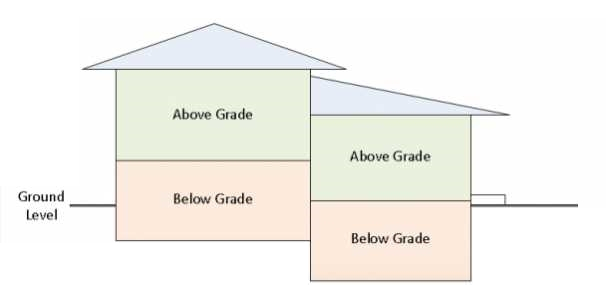
When calculating above grade square footage, only the finished area on levels that are 100% above grade (ground level) should be included. If an exposed or walk-out lower level has one or more sides even partially below grade, all rooms on that level must be counted as below grade. If the above vs. below grade square footage breakdown is questionable, and photos are unclear, the assessor record is the deciding factor. Here is a simple graphic showing above and below square footage:
Notes: To be considered finished square footage, the space must be heated, have finished walls (painted concrete does not count), have a finished ceiling (no exposed floor joists), and have a finished floor (painted concrete does not count). If one of these four components is missing, the space can still be counted as finished, but disclosure of the missing component must be included in the MLS remarks (this rule applies to all levels).
Only finished rooms may be included in the room dimensions section. An exception is made for the “Other Room” selections of Three-Season Room, Screened Porch, Covered Porch, Deck, Patio, and Garage, as the name discloses those spaces as unfinished.
Detached living space cannot be included in the square footage totals, but may be noted in the remarks.
The basement feature of “finished” can be used if the whole basement is finished (besides a utility/furnace area). The “partially finished” feature should be used if only a portion of the basement is finished.
When entering a new listing, you are asked to provide the source for fields such as square footage, year built, acres and waterfront (if applicable). If the data came from the public/tax record, “Assessor” can be used. If none of the options apply, you may select “Other”, but must explain what “Other” is in either the public or broker-to-broker remarks.
The MLS does not define what is a bedroom. Listing agents should use common sense when calling a room a bedroom. If counting a room as a bedroom that is not a typical bedroom (i.e. does not have a closet, is accessible only by going through another room, etc.), please indicate in the remarks what makes it atypical so that showing agents and potential buyers are informed before a showing.
If a lower level room does not meet safety guidelines for a bedroom, it may not be labeled as a bedroom in the MLS. See the file below for guidelines from the Department of Safety & Professional Services. If a lower level room meets these guidelines, a photo showing the egress window in that room is required within 7 days of the list date.
Bedroom dimensions are required; 0x0 is not acceptable and will be flagged for incorrect data.
Please use the following guidelines when identifying bathrooms in the MLS:
There is an edit check table set up for school names (elementary, middle and high). When entering schools, use the actual school name, not the school district. School District is a separate field. If there is a situation of uncertainty by the school district (NOT the agent) as to which school the children of a family buying a particular property will go to, you may enter CALL DIST. Entering CALL DIST may cause your listing to be missed in a search if there is truly no uncertainty regarding boundaries in the school district. For a list of schools by county and school district in PDF format, see below.
The MLS has three remarks fields:
At least one entry is required under feature categories marked with a red (R). You may select multiple choices under each category, so please select as many as apply to maximize exposure for your listing. If you select OTHER, you must explain in the Remarks what the other characteristic is.
A guide to identifying the Architectural style of homes & condominiums can be found below.
Instructions on how to add and search for open houses and broker opens/tours in Paragon can be found below.
Within Paragon, you can enter website addresses for three different virtual/video tours.
The fields labeled Virtual Tour and Video Tour can be used interchangeably; the MLS does not recognize a difference. Both of these tours must be unbranded, which means no agent/company branding or contact information may be included on the tour itself or the site on which the tour is hosted.
The third field, Branded Virtual Tour, is provided for exports to public websites. This field is not on any reports within Paragon. Feel free to include agent/company branding within this tour.
| MLS Field | Can contain agent/company branding or contact info? | Displays within the MLS? | Sent to outside websites (Zillow, Realtor.com, Homes.com, etc)? |
|---|---|---|---|
| Virtual Tour | No | YES | YES |
| Video Tour | No | YES | YES |
| Branded Virtual Tour | YES | No | YES |
All three fields are for *pre-recorded videos/tours (see the Virtual Open Houses/Virtual Private Showings section for information on live-streaming options).
When you create or purchase a virtual tour, that tour needs to be stored on a website outside of Paragon. If you purchase a tour from a tour provider, they will create a web link (url) for you and send that link to you. If you create your own tour, you will need to load it to a video hosting service such as YouTube or Vimeo. Once you have the web link, you would copy or enter that link into the appropriate fields within Paragon.
When adding a new listing, the Virtual Tour fields can be found under the Open House/Tour/HitCount section. Within Maintain, a quick link is available via the “Select an Action” link. If you are provided with, or create both branded and unbranded tours, please make sure to load the branded tour in the Branded Virtual Tour field. Unbranded tours can be entered into either the Virtual Tour or the Video Tour fields. These fields can be used interchangeably; the MLS does not recognize a difference.
Some Important Video Tips: It is NOT necessary to have a cache of expensive equipment to do effective video filming/recording. In most cases, a good cell phone or tablet will do the trick. If you are looking for resources on building such a cache of equipment, check out YouTube for Gimbals, mobile mics, lighting, etc. It is important to remember that a good plan and proper movement will always prevail over equipment, when it comes to quality. Here are a few simple things you can do to make sure your videos are effective:
*Pre-Recorded Video: A video that is recorded and uploaded to a host, such as Vimeo, a website, YouTube, etc. and can be shared as a URL (weblink).
Links for Pre-Recorded Video Hosting:
Vimeo
YouTube
*Live Video Stream: Video that is broadcast live to a specific party or group via platforms such as Facebook Live, Zoom, Google Meet, FaceTime, etc.
Links to Popular Streaming Services:
Facebook Live
Zoom
Google Hangouts/Meet
Microsoft Teams
Twitch
To submit photos in Paragon, go to Listings -> Maintain -> Select an Action -> Picture Administration.
Each listing in the MLS system can include up to 90 photos. Photos are required for all Active and Sold Comp listings, with the exception of vacant land, commercial property, properties under construction, and properties in Delayed status. One photo must be a front exterior view from street level, although it is not required to be in the first photo position. The additional 89 photos can be any other exterior or interior views the agent and seller think best represent the property.
If an active listing, as identified above, does not have a photo after 7 days from the contractual listing date (input date for sold comps), the MLS will send a notice to the Broker and listing agent with 5 days to provide a photo. A fine of $50 per day (up to $250) will be assessed if not uploaded within 3 days after first notice from MLS Staff. An exception will be made if the seller requests that no photo appear (whether one or all).
Additional photo guidelines:
NOTE: Use of photos that you do not have the right to may lead to a fine of $25 per photograph in addition to any legal or equitable remedies available to the copyright owner of the photograph(s). Click here for more information.

Once photos are uploaded to listings in Paragon, you have the option to label them. We foresee agents using photo labels to clarify (i.e. First Floor Bath), and to bring attention to things in the photo that are not so obvious (i.e. New Appliances). You will be able to pick and choose which photos you think need labels. Entering a label on one photo will not require labels on all.
You will enter photo labels on the Photo Administration screen along with the photos. Click on the “Add Label” option at the bottom of a photo space, and in the box that appears, type the description for the photo. Click Save when you have finished. Easy!
It is against MLS rules to enter contact info or agent/company promotion within photo labels. The same rules that apply to the public remarks apply to photo labels. If there is abuse, we will be forced to limit labels to a pre-defined list. Please do not make us limit your ability to be creative.
MLS rules prohibit agents from copying other agents’ property photos without permission. Although this practice is a violation of copyright law, the MLS also has incorporated the following rule so that MLS staff can more quickly act to remove photos if need be.
Participants submitting a photograph(s) to the SCWMLS represent that they have the right to authorize and are authorizing the SCWMLS to publish the photograph(s) anywhere the SCWMLS data is intended to appear. Participants shall indemnify the SCWMLS in the event of any action or litigation relating to the reproduction of such photograph(s) by the SCWMLS or other authorized entities.
Participants submitting a video or photograph(s) to the SCWMLS with the knowledge that they do not have the right to authorize the SCWMLS to publish the video or photograph(s) shall be subject to a fine of $500 per listing in addition to any legal or equitable remedies available to the copyright owner of the photograph(s).
The SCWMLS shall remove in a timely fashion any photograph(s) submitted by a Participant who doesn’t have the right to authorize the SCWMLS to publish the photograph.
Paragon MLS allows you to attach documents to a listing (click here for instructions). Documents that you may wish to attach include property condition reports, lead-based paint disclosures, flood information, maps, etc. NOTE: PDF files work best. All documents can be downloaded or printed by agents within Paragon.
Within the Associated Documents maintenance window, you will see a check box for Public. If this box is checked, the document will automatically be included when a listing is emailed from Paragon and will be visible to agents outside our MLS via WIREX. When entering the description for your document, please remember your audience includes the public.
NOTE: Documents may not be marked public if they contain personal data, contact information, agent or company branding/logos, or instructions to contact/call anyone. This restriction also applies to builder information/branding. An exception is made for documents that are contractual in nature (ex: RECR, addenda). Contractual documents may display the name of the listing firm, but it must be in typeface no larger than the median typeface of the document.
The MLS requires specific associated documents for Auctions, Farms, Limited Service Listings, and Manufactured Homes with Land. *You will be assessed a fine of $50 per day (up to $250) if required associated documents are not uploaded within 3 days of first notice from MLS Staff. Click here for the appropriate form.
To customize each listing individually for the ShowingTime for the MLS™ feature, you can go to Maintain Listings and select the Showing Time option from the Select an Action drop-down box. Click the link below for ShowingTime support & helpful resources.
Agents working with a buyer* are required to enter into a written agreement with that buyer prior to showing them a listed property (including virtually).
The agent has, in essence, three ways to show a buyer a property. The buyer may be:
All forms can be found in ZipForm or the WRA Forms Library.
In ShowingTime, agents are required to affirm that a written agreement will be in place before entering a property for which a showing is scheduled. As NAR has tasked the MLS with the responsibility of ensuring this agreement is secured before each showing, the SCWMLS reserves the right to request copies of such agreements, and members must submit them immediately upon request.
*Note: A written showing agreement is not required in the following cases:
Learn more about TrustFunds by clicking the link below:
Agents with basic Realtor level access have the ability to add partial listings via the Listings menu. This streamlines the add listing process by allowing agents to directly key in listing data as opposed to filling out profile sheets. Partial listings can then be reviewed and saved as live listings by users with office administrative access. Click here for listing input training resources.
When entering a partial listing, an agent should make note of the partial listing number assigned to pass on to their office listing administrator, along with any documentation required by their office. If the listing should be entered in a status other than Active, that should also be noted. Administrators can then pull up the partial listing to complete under Listings – Maintain Partials.
A Few Tips:
If you have administrative access to the Paragon system, you can convert your Subject Property to an Active or Delayed MLS listing. The “Add Listing” function (under the Listings menu in Paragon) should be used to add listings in all other statuses.
Paragon MLS allows you to copy listing information from one MLS number to create another. You can only copy your own listings (Brokers and administrative personnel can copy any office or firm listing). NOTE: You cannot copy one class to create a listing in another class.
To copy an existing listing and create a new listing – Go to Maintain Listing (on the Listing Menu) and select the appropriate listing by entering the MLS number or address. Select Copy/Clone from the Select an Action box. This will pull over the previous listing data into a new input screen. Enter the new status, price, list & expiration dates, and tax & assessment info. Review the other fields & update anything else that has changed since it was last listed.
The first time the listing is saved (either “Save Listing” or “Save as Partial Listing”), you will be asked if you would like to copy over photos, photo labels, and/or documents from the previous listing. Check the boxes next to any items you’d like to copy, then click Copy. If this step is bypassed, the photos/docs will need to be manually uploaded. Once saved, the system will assign a brand new MLS number.
If a team participates on the sale side of a transaction, and is registered as a team in the MLS, the listing office must record the sale under the team record, if requested. If the team has opted not to register, and does not come up on the list of sale agents within Paragon, the listing office has the option to record either the team lead or the team member assisting the buyer. Team names are required to include the word Team or Group, so it will be more evident, when reviewing productivity, if an entity is an individual or a team. For more information on setting up a team, click the link below.
Learn more about WIREX by visiting the link below:
For a complete list of rules, see below.
back to top