
Main Menu
Call MLS Office: 608.240.2800 then press 3 (Mon-Fri 9:00am – 5:00pm)
Email (if it is less urgent): keys@wisre.com
Call Supra Technical Support: 877.699.6787 (7:00am – 9:00pm, 7 days a week)
The Supra electronic keybox system allows the listing agent, the showing agent, the property appraiser, and the home inspector secure and convenient access to the property listed. The Supra keybox is attached to the door handle, and the key to the property is secured inside the keybox. Agents access the property key within the keybox using a registered and personalized app on their smartphone.
Supra keyboxes provide security for the seller during the real estate selling process. Showing agents are required to make an appointment before showing a property. Once this appointment is granted, the showing agent will use the Supra eKEY app loaded on their smartphone to retrieve the property key from the Supra keybox. The Supra keybox records the name of the agent opening the keybox, and records the time the property key is remove, and the time it is replaced. The listing agent has access to reports showing this keybox activity. In addition, listing agents can control the hours the Supra keybox can be opened, thus controlling the hours the property key can be accessed.
Supra keyboxes increase efficiency and decrease frustration for the agent. If you have a Supra eKEY, you as a showing agent do not have to pick up property keys at the listing office or track down a manual keybox code. As a listing agent, you do not have to meet the showing agent at the property or ask your seller to leave the door open. The Supra eKEY updates each evening via an internet or cell phone connection. Once that update occurs, the eKEY will open keyboxes via Bluetooth technology. This means you do not need an internet or cell phone connection to open a Supra keybox.
Supra keyboxes keep the listing agent informed of showing activity. Listing agents can set up an alert to notify them when a Supra keybox is opened and then closed. With these alerts, you will not have to wonder if a showing agent has finished their showing, or if they actually showed up for the showing.
The eKEY is an app on a smartphone or tablet that allows you to
Click here for a quick video on how to use a Supra eKEY
For a list of compatible devices that can be used as an eKEY, click here. Please note this list is not all inclusive, and changes as new devices come on the market. If you have questions about a device not on this list, please contact Supra at 877.699.6787.
If you fall under one of the following categories, you are eligible to lease an eKEY, subject to the execution of an eKEY Lease Agreement and payment of applicable fees:
The Supra eKEY App can be downloaded from the Google Play Store or Apple App Store, but cannot be used until you submit an eKEY agreement and pay the annual fee for usage:
AGREEMENT – Please complete the eKEY Agreement here:
During the application process, you will be required to pay the applicable fees as listed below.
FEES – Based on when you activate your eKEY, you will be required to pay a prorated portion of the annual fee below. The billing year for the eKEY runs from July 1 through June 31. Billing for the eKEY annual fee is emailed to agents mid-May and is due mid-June.
| Annual Fee | Processing Fee | Total Due | |
| July-September | $175.00 | $50.00 | $225.00 |
| October-December | $131.25 | $50.00 | $181.25 |
| January-March | $87.50 | $50.00 | $137.50 |
| April-June | $43.75 | $50.00 | $93.75 |
The eKEY app expires daily at midnight – it will then need to connect to the Supra network using cellular service or WiFi to update, which it is programmed to do automatically. If it does not update, it cannot be used to open boxes.
If the eKEY app is opened and has not already updated for the day, it immediately attempts a wireless sync.
If it is unable to sync and update, a RED “X” appears over the Update Key button. By pressing the Update Key button you will be prompted for an Emergency Update or Wireless Update.
Wireless Update: Syncs with the Supra system to update the key for the day
Emergency Update (update code): Updates a key (for the day) that has no wireless data connection. Obtain an update code from:
If you get a new phone, you will be required to reinstall the eKEY app and reauthorize. You may also be required to reauthorize if the software on your phone is updated. To reauthorize your eKEY:
SupraWEB is the agent website, available at www.supraekey.com, which allows you to perform the following functions:
In order to use SupraWEB, you do need to register and set up a user ID and password. The first time you login, you will also be asked to enter your key serial number (displays at top of eKEY screen), your PIN and organization (select South Central Wisconsin from dropdown list.)
NOTE: SupraWEB can also be accessed from your device’s eKEY app.
Showing notifications can be set up to go to an email address or a phone number (text)*.
Notifications can go to multiple parties (owner, team member, etc.)
SupraWEB allows you to have notifications sent for all your listings/keyboxes or you can have the notifications on just one listing/keybox.
Step by step instruction for setting up showing notifications can be found here:
End of Showing notifications are automatically set up if you set up Showing Notifications in SupraWEB. You will receive a notification of the end of a showing if:
If none of the above occurs within 60 minutes of the beginning of the showing a message that the showing ended due to a timeout is sent to you
* Click here for a list of cell phone carriers email to text formats
This access allows a non-member, such as an agent from outside our MLS, or a contractor, one-time access to a single keybox.
To Grant Access from your eKEY app:
More detailed information is available via the PDF Document below:
For Listing Agent:
________________________________________________________________
The person you have granted access to will receive a text message. If they ask you for assistance, please have them call the MLS office at 608-240-2800, option 3. If after hours please have them call Supra technical support at 877-699-6787.
For use by non-member keyholders who routinely work with a member
Call Before Showing (CBS) codes are required when a non-member keyholder accesses a Supra keybox. These non-member keyholders provide ancillary services such as photography, staging, and radon services. These individuals do not qualify for membership, but have opted to lease an eKEY, which allows them to avoid having to request more restrictive NMA (non-member access) codes each time they perform a service. These individuals typically work for the same offices/agents on a regular basis.
When these individuals need access to a listed property, they will contact the listing office/agent and request a CBS code for the keybox they need to access. Only the listing office/agent will have access to this code. The CBS code provides a second layer of security, as the non-member also enters their individual PIN.
If your office does not have the CBS codes recorded in their internal keybox tracking system, you can look up the CBS code in two ways:
via SupraWEB
From Your eKEY App
Each MLS in Wisconsin has its own, and separate keybox system. When setting up a showing for a property from another MLS, do not take for granted there will be a Supra keybox, or that you will be able to access it if there is. Within Paragon, listings from another MLS are prefixed with 2 alpha characters. Within WIREX look for the source MLS (Data From:)
Below, please find a list of surrounding MLSs in Wisconsin, and instruction on what you need to do to access their keyboxes:
Central Wisconsin MLS (CW prefix on listings) – We have an automatic cooperating agreement with the Central Wisconsin MLS. You have access to their Supra keyboxes without doing anything extra.
La Crosse MLS (MM prefix & located in the La Crosse area) – We have an automatic cooperating agreement with the Greater La Crosse Area MLS. You have access to their Supra keyboxes without doing anything extra.
Metro Milwaukee MLS (MM prefix) – Most agents in the Metro Milwaukee MLS use the SentriLock keybox system, not Supra. Contact the listing agent to request a one-day code for access.
Northeast WI MLS (NE prefix) – Complete this form and send it to keys@wisre.com. Please note that the agreement also needs to be signed by your broker. Please allow 48 hours for the Northeast MLS to process your request for access to their Supra keyboxes.
Northwest WI (NW prefix) – Agents in the Northwest MLS use the SentriLock keybox system, not Supra. Contact the listing agent to request a one-day code for access.
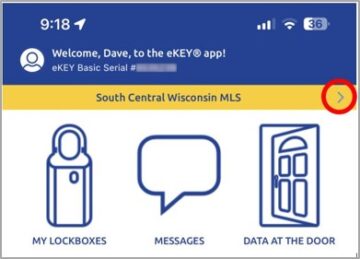
You can check to see other MLS’s, for which your eKEY is currently programmed to access, by clicking the right arrow (>) next to “South Central Wisconsin MLS” within the orange bar on your Supra eKEY app home page.
If you also practice real estate in another state, and within an MLS that also uses Supra, you may be able to use one Supra eKEY in both states. Supra has 2 server clusters in the United States. Wisconsin is on server cluster 2. If your other MLS is also on server cluster 2, we can set up a reciprocal. If, however, your other MLS is on server cluster 1, you will need to lease a second Supra eKEY. Contact us at keys@wisre.com or 608-240-2800 for more information.
The eKEY is a wonderful timesaving tool that also carries with it the need for a huge amount of responsibility.
If you are found in violation of any of the policies outlined in your eKEY Software Lease and Usage Agreement, or any part of our MLS Lockbox System Rules (click to view), disciplinary action may range from a letter of warning to a fine of $1,000 and may also include termination of lockbox system and/or MLS services.
| Summary of Violations and Fines | ||
| Violation | 1st Violation* | 2nd Violation* |
| Unauthorized Property Access to Non-Member/Buyer | $1,000 | $3,500 + 30 day Supra suspension |
| Accessing Lockbox/Property without Confirmed Appt | $1,000 | $3,500 + 30 day Supra suspension |
| Giving Key to Non-Keyholder MLS Agent or Suspended Member | $1,000 | $3,500 + 30 day Supra suspension |
| No access to lockbox during the appeal process | ||
| Fine Amount | ||
| Keybox Not Returned After Request | $3/day | |
| Keybox Lost/Damaged | $50 | |
| *Fine Applies to Agent and Broker | ||
The Supra keybox works in conjunction with the eKEY. The Keybox holds the keys to the listed property. Any agent with an eKEY, with a confirmed appointment from the listing office/agent, will be able to obtain the keys to show the property to prospective buyers.
It is the Realtor’s responsibility to secure the keybox, via the shackle, so it cannot be removed from the premises. The Realtor should work with the seller to select the most appropriate and secure location. When placing the property key(s) into the keybox, only key(s) should be included. Please do not include key rings, as they can cause the key container to jam.
Supra Keyboxes are owned by the South Central Wisconsin MLS and loaned to MLS Participants (brokers) based on their listing inventory.
Who can be issued a Keybox?
Keybox checkout is limited to the Participant members (brokers) only. The keybox agreement must be signed by the broker, but can be picked up for the company by anyone the broker designates.
How many are issued?
Keyboxes are disbursed at a rate of 125% of current active, withheld/delayed and Offer-No Show (PND) listings in the following categories: Single Family, Condo, Multi-Family, and Business/Commercial.
To check out boxes, call the MLS at 608.240.2800 or email keys@wisre.com. A keybox agreement (CLICK HERE) must be signed by the broker before Keyboxes can be picked up.
What is a Shackle Code?
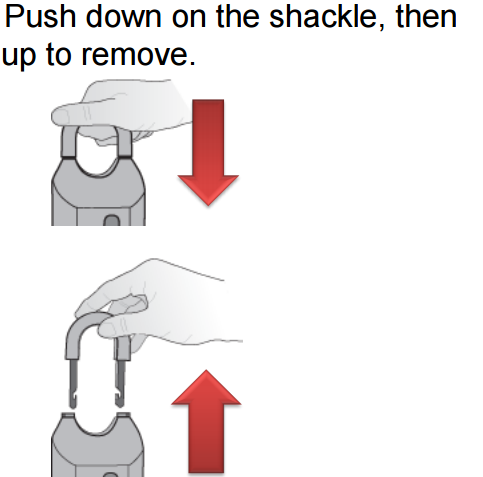
Each Keybox has its own shackle code. This releases the shackle so that it can be attached to a property (doorknob, railing, etc.) Shackle codes are distributed with each new keybox.
If you add your keyboxes to your eKEY inventory, either on SupraWEB or on your eKEY app, you can keep track of your shackle codes and have them available at your fingertips. The shackle code is also available from the MLS office.
To Release Shackle:
What is the Key Container?
The key container releases from the bottom of the Keybox using your eKEY and PIN. This is where the property keys are placed for safekeeping.
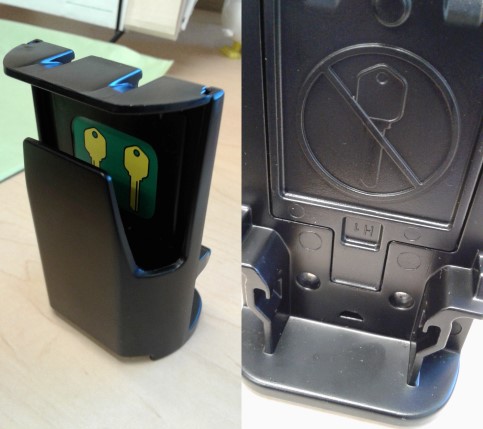
The correct location to place property key(s) is in the compartment in the front of the keybox, where the green sticker with bright yellow keys is attached. Do not place keys in the back of the key compartment where you will see an image with a strikethrough key.
Only key(s) should be included. Please do not include key rings, as they can cause the key container to jam.
Please use care in returning keys to the box, so you aren’t preventing the next agent from showing the property.
To release the key container:
Keyboxes come from the factory preset to open between the hours of:
Please keep in mind that if the access hours are changed, the keybox will recognize the start and end times based on Central Standard Time. Example: Keybox hours are changed to 8:00 AM – 7:00 PM. If we are in Daylight Saving Time, the keybox can be accessed between 9:00 AM and 8:00 PM.
- Open up Supra ekey app
- Tap on “My Keyboxes” (Keybox has to be assigned to you, if not you need to add it first)
- Tap on keybox serial number
- Tap program keybox
- Change the time to what you wish
- On bottom click “Program”
- Enter the Shackle Code
- Connect via Bluetooth
- You will receive a success message when the change is complete
When opening the keybox shackle, select “Adding on a new listing” as the reason for opening the shackle. Enter the house number or the MLS number and check to add the keybox to your inventory. Tap on Begin and connect to the keybox via Bluetooth. The keybox will appear under My Keyboxes.
The easiest way to assign a keybox to a listing if you are not near the keybox, is via Paragon. Open your listing within Listing Maintain and select Supra Lockbox under “Select an Action”. Click on Assign, enter the keybox serial number and shackle code, and click Save. Data flows from Paragon to Supra every 15 minutes. Please wait 15 minutes and then press the Update button on your eKEY. You should see the keybox under My Lockboxes.
Each time an iBox key container is released it stores a showing record. If you assigned your keyboxes (either via the eKEY app, Paragon, or on SupraWEB online) you can view this information (date/time, showing agent name & phone number) by logging on to SupraWEB:
Or, if you have the iBox with you, your eKEY app allows you to read keybox activity to see who has opened the box (you must have the shackle code for that particular box in order to do so):
Lost iBoxes should be reported to the MLS office immediately. There is a $50/box replacement charge.
Defective iBoxes should be returned to the MLS office for repair and/or replacement. Typically there is no charge for this, unless due to causes beyond the normal wear and tear, in which case the broker will be assessed a $50/box charge.
back to top